
This release covers all changes since 2.0.76. It also lists the fixes that went into 2.0.76 after its release notes were written.
New Features
Today button in the diary
The diary has a Today button again. It is the calendar icon just before the back buttons in the diary toolbar. Press it to jump back to today from any date. In a week diary it goes to the current week. Your view and the clinicians you have chosen stay the same.
The date stays in view when you scroll
When you scroll down the diary, the date line (for example 9, Mon Nov 2026), the clinician names and the day headings now stay at the top of the diary. You can always see which day and which clinician you are looking at. In a week diary, the headings still move sideways with their columns.
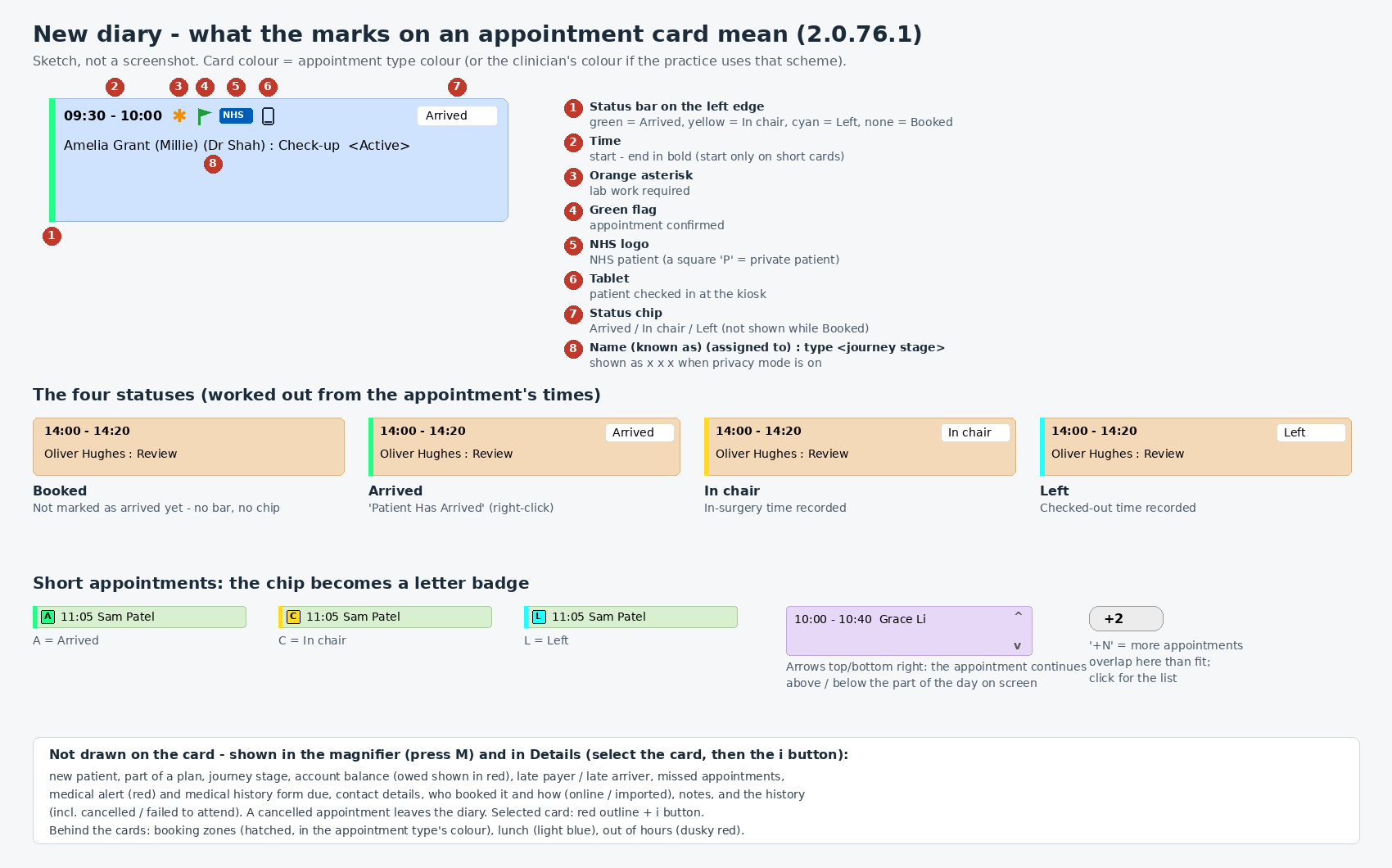
Note: what the marks on an appointment mean
A new help article explains every mark on an appointment in the diary: the coloured bar and label for Arrived, In chair and Left, the lab work asterisk, the confirmed flag, the NHS and private marks, the kiosk tablet, and what the magnifier and the details panel add. See What the marks on a diary appointment mean.
Resolved Issues
Appointment comments
Comments typed into an appointment’s Comments box were not saved. They are now saved as you type. Inserting a comment template now adds the whole template where your cursor is, instead of only its first line.
Dental chart
A filling, inlay or onlay covering several surfaces was charged once for each surface, so an MOD filling cost three times its price. It is now charged as one item. Its size comes from its treatment code, and the surfaces still show on the chart.
After you chart a treatment with the Tooth Dial, the Add Treatment window now opens so you can check the price and add a comment. Cancel removes the treatment you just charted. The window is more compact, fits smaller screens, and has an Insert template list for the comment.
- Caries no longer shows a ring of materials on the Tooth Dial.
- Moving from one dial item to another, for example from Inlay to Caries, no longer leaves the previous item’s materials showing.
- The extra “Images” lines under the Existing work list have been removed. Images on a tooth still show in the image tray, on the tooth and in Tooth History.