
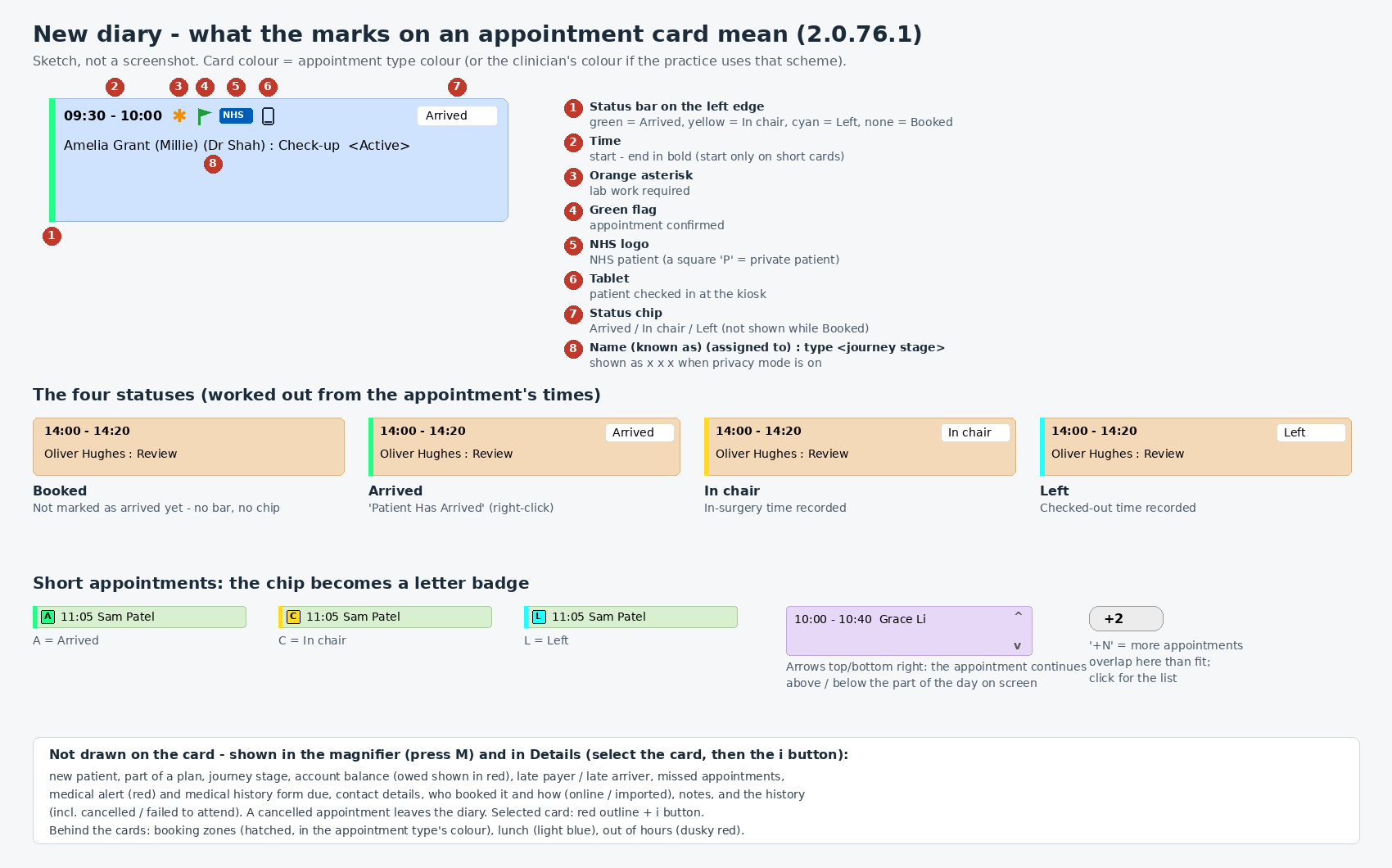
Each appointment in the diary is a coloured card. The card’s colour is the appointment type’s colour, or the clinician’s colour if your practice colours the diary by clinician. The marks on the card tell you, at a glance, where the patient is and what to look out for.
Where the patient is
An appointment has one of four statuses. Each one has its own colour, shown as a bar down the left edge of the card and as a small label at the top right.
- Booked: no bar and no label. The patient has not arrived yet.
- Arrived: green. Right-click the appointment and choose Patient Has Arrived. If you did this by mistake, choose Patient Has Not Arrived.
- In chair: yellow. The patient has gone into the surgery.
- Left: light blue. The patient has been checked out.
On short appointments there is no room for the label, so a small coloured letter shows instead: A for Arrived, C for In chair and L for Left.
The small marks after the time
- Orange asterisk: lab work is required. Right-click and choose Work Required to turn it on or off.
- Green flag: the appointment is confirmed. Right-click and choose Confirm Appointment.
- NHS logo: an NHS patient. A square P means a private patient.
- Tablet: the patient checked themselves in at the check-in kiosk.
Below the time is the patient’s name, the name they like to be known by in brackets, who the appointment is assigned to, the appointment type and the patient’s journey stage. In privacy mode every letter shows as x.
Other marks
- Arrows at the top or bottom right: the appointment carries on above or below the part of the day you can see. Scroll to see the rest.
- +2 (or another number): more appointments overlap here than fit side by side. Click it to see the list.
- Red outline: the appointment you have selected. Click its i button for the full details.
More about the appointment
Some things are not shown on the card itself, to keep it easy to read. Press M to switch on the magnifier and point at an appointment, or select it and click the i button. There you can see whether the patient is new, whether the appointment is part of a treatment plan, the patient’s account balance (money owed is shown in red), any missed appointments, a medical alert (in red) or a medical history form that is due, contact details, who booked the appointment and how, any notes, and the appointment’s history.
A cancelled appointment is taken off the diary. A missed appointment (failed to attend) is shown in the appointment’s history.
Behind the appointments you may see coloured, striped areas. These are booking zones, set aside for a particular type of appointment. Light blue shows the lunch break, and a dusky red shows time outside working hours.