
Record NHS numbers, exemptions, evidence and supporting details, get the patient’s declaration, and take the NHS charge through Commit Appointment.
Who it is for: practice managers and administrators, clinicians, dental nurses, receptionists.
In this guide:
- Record a patient’s NHS number and details
- Record an exemption or remission from NHS charges
- Record the supporting details for an exemption
- Get the patient to sign their NHS declaration
- Take the NHS patient charge at the end of a course
1. Record a patient’s NHS number and details
You can complete the NHS Details panel so the claim identifies the patient correctly.
Why this matters NHSBSA matches every claim to a patient using their name, date of birth, address and NHS number. A wrong or missing NHS number is a common cause of rejected or queried claims. Ethnic origin is also collected on every claim.
Where to find it Open the patient’s record and choose the NHS Registration tab. This tab only appears once the patient is marked NHS on the Personal tab.
How to
- In the NHS Details panel, type the 10-digit NHS Number. Copy it from the patient’s NHS letter, the NHS App or a GP letter. Don’t guess it.
- If the patient has changed their surname (for example, after marriage), enter the old one in Previous Surname. This helps NHSBSA match their history.
- Choose Ethnic Origin from the drop-down. The patient chooses their own category. If they don’t want to say, choose the “declined” option. Don’t choose for them.
- Click Save on the patient toolbar.
Good to know
- If the NHS number is left blank, Edit Claim later shows it as 0000000000 in red. Fix the number on the patient’s record, not only in the claim, so the next claim is right too.
- Name, address, gender and date of birth come from the Personal tab. Keep them up to date at every visit by asking the patient to confirm them.
- Ethnicity categories were updated for April 2026 claims. If the list doesn’t include the patient’s chosen category, tell your practice manager.
More detail: Patient nhs registration details.

2. Record an exemption or remission from NHS charges
You can tick the right exemption code and say whether evidence was shown.
Why this matters Many patients don’t pay NHS dental charges, for example under-18s, pregnant women and people on qualifying benefits. Some pay less with an HC3 certificate. The exemption you record decides the charge ChiralCloud takes and the code sent on the claim. NHSBSA checks exemption claims afterwards. If a patient wrongly claims, they can receive a penalty charge notice of up to five times the charge, plus the charge itself.
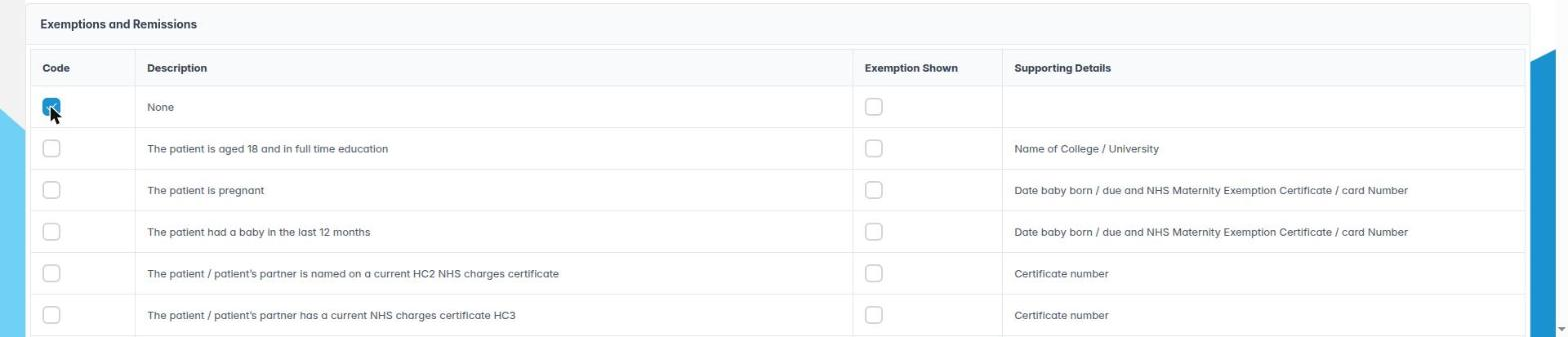
Where to find it NHS Registration tab, Exemptions and Remissions panel.
How to
- Ask the patient whether they are entitled to free or reduced-cost treatment, and why. Ask at every course of treatment, because entitlement changes.
- Find the row that matches. Each row shows a Code, a Description and, where needed, the Supporting Details NHSBSA expects.
- Tick the box in the Code column.
- Ask to see proof, such as the certificate, card or benefit letter. If you have seen it, tick Exemption Shown. The description changes from “…but evidence of remission/exemption has not been provided” to the plain version.
- For codes that need details, ticking Exemption Shown opens the supporting details dialog (next step).
- Click Save.
Good to know
- Leave Exemption Shown unticked if the patient has no evidence with them. The claim then records “evidence not seen”. It is still a valid claim, and the patient is responsible if their claim turns out to be false.
- Any ticked exemption sets the NHS charge to £0 at Commit Appointment. HC3 holders still pay part of the charge, so check the amount before you issue the receipt.
- Codes listed for Wales (30) and the Isle of Man (36, 37, 71–82) don’t apply to England claims.
More detail: Patient nhs registration details.
3. Record the supporting details for an exemption
You can complete the “Claim for free or reduced cost NHS Dental Services” dialog with the details NHSBSA checks.
Why this matters For benefits, certificates, pregnancy, recent birth and 18-year-olds in full-time education, NHSBSA checks the claim against its records. It needs the right details to do that: certificate numbers, the benefit holder’s name and NI number, or the baby’s due date. Without them, NHSBSA can’t verify the claim, and the patient may receive a penalty charge notice they didn’t deserve.
Where to find it The Claim for free or reduced cost NHS Dental Services dialog opens when you tick Exemption Shown on a code that needs supporting details. It can also open from Edit Claim in NHS Management.
How to
- Find the section that matches the patient’s reason:
– I am entitled to free NHS dental services because on the first day of treatment…: full-time education at 18 (Name of college or university), pregnancy (NHS Maternity Exemption certificate/card no.), or a baby in the last 12 months (Date Baby due / born).
– …because during the course of treatment I, or my partner, receive…: Income Support, income-based Jobseeker’s Allowance, income-related ESA or Pension Credit Guarantee Credit. Record Print name of person receiving benefit, Date of Birth and National Insurance Number.
– …because I am named on one of the following certificates…: HC2 Certificate or NHS Tax Credit Exemption Certificate (Card), with the Certificate Number.
– I am entitled to reduced cost NHS dental services because…: an HC3 certificate and its number. - Type the details exactly as they appear on the document.
- Click OK, then Save the record.
Good to know
- The options are set by the code you ticked, so the matching item is ticked already.
- The labels warn you which benefits don’t count, for example contribution-based JSA and Savings Credit on its own. Read them aloud to the patient if they’re unsure.
- Universal Credit is now a common route to free treatment. If it isn’t on the list, tell your practice manager rather than picking a different benefit.
More detail: Patient nhs registration details.
4. Get the patient to sign their NHS declaration
You know when the patient must sign the NHS declaration and how to keep evidence of it.
Why this matters For every NHS course of treatment, the patient (or someone signing for them) must sign a declaration. In England this is the FP17PR patient declaration. It confirms their details and any claim to free or reduced-cost treatment, and allows NHSBSA to check it. The clinician’s declaration on the claim relies on it. If there is no signed declaration, the claim can be challenged at audit, and the practice may have to repay it.
How to
- At the start of each course, confirm the patient’s personal details and ask about exemption (see the previous steps).
- Ask the patient to read and sign the declaration. Use the current NHSBSA form (the April 2026 FP17PR revision in England) or the method your practice has agreed, such as a signature form built in Form Designer that copies the official wording.
- If the patient claims exemption and has shown evidence, make sure the Exemption Shown tick in ChiralCloud matches what the form says.
- Scan or upload the signed paper form to the patient’s Documents tab, or check that the signed online form has arrived in the patient record.
- Keep the declaration for as long as your NHS contract requires. Your practice’s records retention policy will say how long.
Good to know
- A parent or guardian signs for a child, and a carer can sign for an adult who can’t sign. The form asks for their details.
- If the patient’s exemption changes part-way through a course (for example, they start receiving a benefit), record the change and ask them to sign again.
- ChiralCloud doesn’t print the FP17PR itself, so make sure reception always has the current version to hand.
More detail: Patient nhs registration details.
5. Take the NHS patient charge at the end of a course
You can take the NHS charge through Commit Appointment and issue an NHS receipt.
Why this matters For an NHS patient, the payment button is Commit Appointment, not Patient Sales, Credit and Cash Sales. Commit Appointment does two jobs at once. It works out the NHS patient charge for the course from the NHS-coded treatment and the patient’s exemptions, and it stacks the NHS claim. If you take money any other way, the claim isn’t stacked.
Where to find it In the appointment editor, the Commit Appointment button on the toolbar (the till icon), or the same button beside the appointment in the appointment list.
How to
- Make sure the treatment for this visit is charted and the exemptions are up to date.
- Click Commit Appointment. If the appointment’s clinician is not a registered performer, the Performers dialog opens. Choose who the claim belongs to, by double-clicking or with OK.
- If the charge is £0 (exempt patient, referral, or no chargeable band), ChiralCloud issues a £0 receipt and stacks the claim without asking anything else.
- Otherwise, Make an NHS Receipt Payment opens with the Amount (£). Choose the Type (cash, card, cheque and so on), check Date Taken and Taken By, and choose Allocated To (Account Group).
- Click Next for card (Transaction No.), cheque (Sort Code, Cheque No.) or narrative details, then Finish. Or click Issue Receipt or Issue Print Receipt straight away.
- You see Claim Stacked: Claim successfully stacked.
Good to know
- Adults pay one charge per course for the highest band reached. Before you commit, know what the charge should be. If a paying adult comes up at £0, or at the wrong amount, stop and tell your practice manager. Don’t take the money another way.
- Back is greyed out on the first page. Use Cancel to start again.
- If you see “The receipt was issued but the NHS claim could not be stacked”, tell the practice manager. The claim must be checked by hand.
More detail: Patient treatment history 2.