The rules for mixing NHS and private treatment, consent and cost transparency, how ChiralCloud keeps NHS and private charges apart, and how to move a patient between NHS and private care.
Who it is for: practice managers and administrators, clinicians, receptionists.
In this guide:
- Know the rules for mixing NHS and private treatment
- Give clear costs and get valid consent for mixed treatment
- Charge an NHS patient who also has private items
- Move a patient between NHS and private care
1. Know the rules for mixing NHS and private treatment
You can explain what can and cannot be provided privately alongside an NHS course in England.
Why this matters Most NHS practices in England also see private patients, and many NHS patients ask for some private treatment. “Mixing” is allowed, but within rules. If you get it wrong, the practice can face a contract breach notice, patient complaints and GDC concerns. Patients have to be able to trust that they were offered everything they need on the NHS.
The key principles (NHS England)
- Clinically necessary care must be offered on the NHS. You can’t refuse, delay or water down NHS treatment to steer a patient to private care.
- The patient can choose to have a particular item privately, for example a white filling on a back tooth or a cosmetic option. That item is then outside the NHS course.
- No “topping up”. You can’t charge a private fee on top of the NHS charge for the same item of treatment, for example to “upgrade” an NHS crown. The item is either NHS or private.
- Some treatment isn’t available on the NHS, such as purely cosmetic work like whitening and most implants. These can be offered privately.
- Write it down. The FP17DC treatment plan must show clearly which items are NHS and which are private, with their costs. The patient needs this before agreeing.
- The NHS charge doesn’t change because private items were added. The patient pays the band charge for the NHS part.
Good to know
- When you are unsure whether an item may be private, check NHS England guidance or ask your commissioner before you offer it.
- Record the conversation in the notes: the options, the NHS alternative, the costs, and the patient’s choice.
- Wales, Scotland and Northern Ireland have their own rules.
2. Give clear costs and get valid consent for mixed treatment
You can explain NHS and private options and their costs in a way that gives valid consent.
Why this matters Since the Montgomery ruling, consent is only valid if the patient understands the reasonable options, including the NHS option, the private options and doing nothing. They also need to know the material risks and the costs. The GDC expects you to give patients clear information about costs before treatment starts, and to tell them if those costs change. Complaints about mixed treatment are usually about money, not dentistry.
How to
- Explain the NHS option first: what it involves and the band charge.
- Then explain any private alternative, what is different about it, and its fee. Say clearly that the NHS option is still available.
- Give the patient time to decide. Don’t pressure them, and don’t suggest that the NHS option is poor care.
- Produce the written plan. For an NHS patient, list NHS items and private items separately, each with its charge. For orthodontics, use NHS FP17(DC0), which has separate NHS and private sections.
- Ask the patient to sign the plan. Keep the signed copy on their Documents tab.
- Record the discussion and the decision in the clinical notes.
- If the plan changes during treatment, update it, explain any change in cost, and get fresh agreement.
Good to know
- Display your NHS charges and your main private fees in the waiting area and on your website, as NHS England expects.
- Make sure the price list your practice uses for private items is the current one.
- Children and exempt adults are entitled to free NHS treatment. Take particular care that they never feel private treatment is the only way to get what they need.
3. Charge an NHS patient who also has private items
You know what Commit Appointment charges an NHS patient, and how private items and account groups are kept separate.
Why this matters For an NHS patient, Commit Appointment works out only the NHS charge, from the treatment codes linked to an NHS code. Private items (codes with no NHS code) don’t change the band or the NHS charge, and aren’t put on the claim. Your team needs to know how private items for NHS patients are charged at your practice, so nothing is missed and nothing is charged twice.
Where to find it
- Appointment editor: Commit Appointment for the NHS charge.
- Patient record toolbar: Patient Sales, Credit and Cash Sales for a separate sale.
- Users › Account Groups for how income is split.
How to
- Check the charted items. NHS items should use your NHS treatment codes, and private items your private codes.
- Click Commit Appointment to take the NHS charge and stack the claim (see Taking the NHS charge).
- Charge private items by your practice’s agreed method, for example a separate private sale from the patient’s record. Never add them to the NHS receipt amount.
- When you issue each receipt, pick the right Allocated To (Account Group). Many mixed practices keep NHS and private income in separate account groups.
- Check the patient’s Account tab. You should see the NHS receipt and the private items separately.
Good to know
- The practice manager sets up account groups in Users › Account Groups (Name, Principle, Status, Default). The Default group is used when no other is chosen.
- Ask Chiral Systems to confirm the recommended way to bill private items for NHS patients in your set-up before you train new staff.
- If an NHS item has been coded as private by mistake, fix the charge before you commit. Otherwise the band and claim will be wrong.

4. Move a patient between NHS and private care
You can change a patient’s NHS status safely, without losing an open claim.
Why this matters Patients move between NHS and private care. Sometimes they choose to. Sometimes the practice no longer has NHS capacity for new courses. A switch in the middle of a course must be handled carefully. The NHS course should be finished, or closed and claimed. The patient must agree in writing to any private care. You can’t move someone to private care during a course to avoid NHS treatment they need.
How to: NHS to private
- Check the NHS Claims History tab and the Stacked tab in NHS Management for any open or unsent claim.
- Finish or close the current NHS course first. Commit the final appointment so the claim, complete or incomplete, is stacked and sent.
- Explain the private terms and fees, and get the patient’s written agreement.
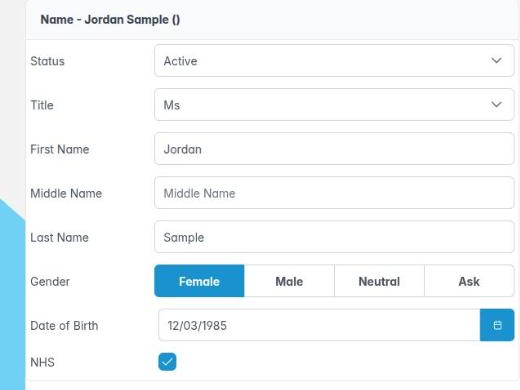
- On the Personal tab, untick NHS and Save. The NHS tabs disappear, and future appointments use Patient Sales, Credit and Cash Sales.
How to: private to NHS
- Confirm that your contract has capacity and the patient agrees to NHS care.
- Tick NHS on the Personal tab and Save.
- Complete the NHS Registration tab: NHS number, ethnicity and exemptions. Get the signed patient declaration.
- Start a new NHS course at the next examination.
Good to know
- Past claims stay in NHS Management after the tick is removed.
- Don’t untick NHS while a claim is still on Stacked or Rejected for that patient. Deal with those claims first.
- Record the reason for the change, and the patient’s agreement, in their notes.